How to catch and fix AI agent regressions (the part nobody talks about)

If you've been scrolling through AI Twitter or LinkedIn lately, you've probably seen everyone obsessing over the Karpathy loop.
Recently Andrej Karpathy dropped an open-source project called autoresearch. The idea was simple: give an AI agent a small, isolated coding task, point it at a repository, and let it run completely on its own overnight. The agent edits the script, runs a test, checks the score, keeps or drops the change based on that score, and repeats. Karpathy let it run and woke up to thousands of GitHub stars and a massive log of autonomous improvements on code he'd already spent months tuning by hand.
Right after that, Shopify CEO Tobi Lütke tried the same thing on an internal query-expansion model. He ran 37 overnight experiments and woke up to a 19% improvement in validation score, ending up with a tiny 0.8B parameter model that confidently beat his hand-tuned 1.6B model.
It's clean and measurable. And it works beautifully when you have exactly one metric to track and one isolated file to edit.
But now let's zoom out and look at the actual production agents most teams are building. You have multi-step workflows juggling six different internal tools, a context window that shifts with every single turn, third-party APIs that change their data structures without telling you, and a base model that your provider can update silently on a random Tuesday night.
Somewhere deep in that chain, your agent starts going stale. Nobody is running 37 clean experiments overnight to find out why. Honestly, nobody even notices until an angry customer messages your support team to say something is completely broken and it's been a month.
The agent didn't stop working nor it crashed. It just stopped learning, and nothing in the standard stack teaches it to self Improve.
That gap is what we're actually talking about here.
Why agent regression bypasses standard monitoring
Before we get to fixes, there's a reason your monitoring stack didn't catch this. Standard monitoring watches the final output. But the failure isn't in the final output.
Agent regression is uniquely frustrating because the agent doesn't stop working. It doesn't crash or throw a clean stack trace. It keeps completing tasks, returning beautifully formatted JSON, and looking totally fine on a basic uptime dashboard. The failure is in plain sight, in simple language of how agent found a workaround or hedge it's strategy, because the one it started with (the one that user wanted) was facing some hiccups.
When you look under the hood of a production regression, it almost always comes down to three hidden patterns:
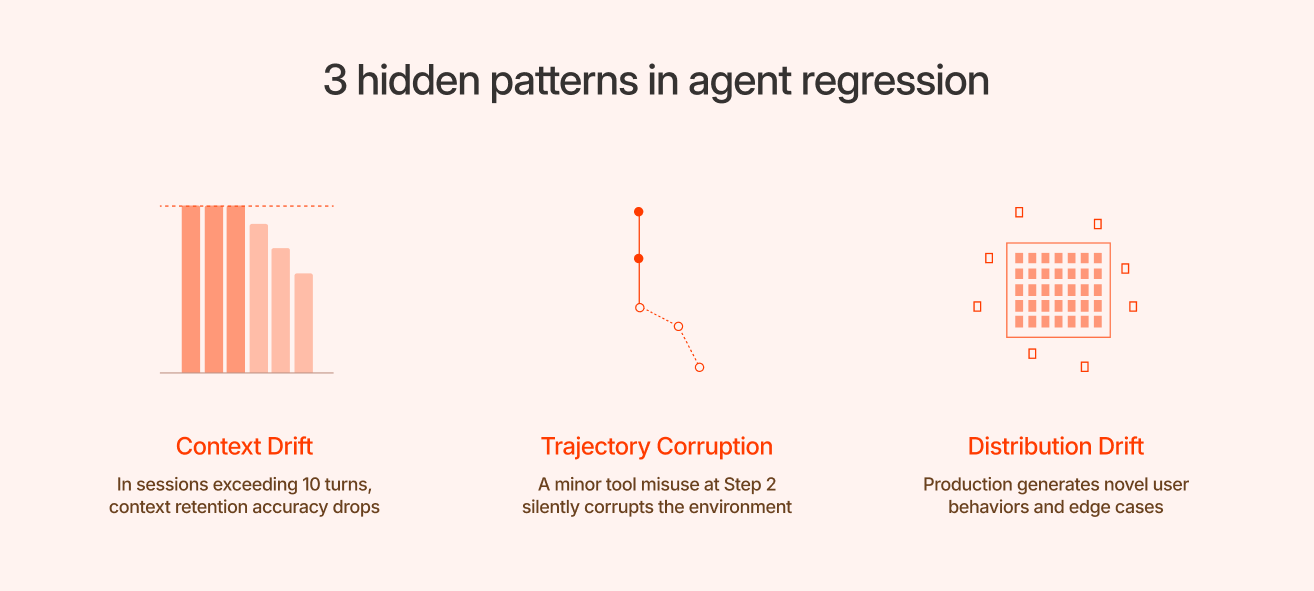
- Context Drift: The common assumption is that context drift is a truncation problem, that the agent runs out of tokens and starts losing information. The model can often see every token in the window. The real issue is that it stops weighting the early ones equally. Constraints and goals from the first turn get buried under the noise of later tool outputs, and the original goal slowly gets buried under later tool outputs, and the agent quietly starts solving the wrong problem.
Example: A user says, “schedule a team meeting next week, but avoid Friday.” By step 8, the agent books a meeting for the following month because it over-indexed on a minor calendar conflict mentioned back at step 4. The final output looks completely reasonable in isolation. It is only wrong relative to the very first constraint. - Trajectory Corruption (The Cascade Problem): If your agent calls the right tool with the wrong parameters at step 2, the tool returns an error or a null. The agent logs this and, with nothing else to go on, concludes the tool is broken. It stops using it. Every decision downstream is now made without a capability the agent was supposed to have, and none of that looks wrong in isolation. The cascade started two turns ago, but the symptom only surfaces at the end.
This is why evaluating only final output quality misses so much. A test suite that checks answers but not paths will pass cases it shouldn't, because the final answer can look correct even when the route to get there was derailed. Full path evaluation catches failures that output-only evaluation structurally cannot see. - Distribution Drift: You built your evaluation suite around the edge cases and user inputs you expected at launch. But production is wild. Real users continuously generate novel behaviors you never saw coming. Over time, your regression tests become a static museum of historical bugs you fixed six months ago, rather than a living shield against what is breaking right now. Your dashboards stay perfectly green, but your users get worse answers.
How to catch it
The core problem is that standard monitoring stacks are watching the wrong thing. You're checking the final answer, but the actual failure happened three steps before it. To break this loop, you have to monitor the journey, not just the destination.
- Watch the path, not just the outcome: For every single run, you need to track the trajectory. You have to verify if the agent took the right steps in the correct order, if it called tools with valid types, and if its stated internal reasoning actually matched the action it took?
- Measure behaviour, not just errors: Non-deterministic systems require behavioral metrics. If a database search tool that used to get called in 40% of user conversations suddenly drops to 12%, an upstream change broke your tool-selection logic. If your agent is suddenly taking more steps to finish the same task, that's a leading indicator of regression before output quality visibly degrades.
- Track by task slice, not overall accuracy: Your blended accuracy metric can sit comfortably at a green 92%, hiding the fact that a specific, high-value customer intent silently dropped from 95% to 60%. The average hides the failure, which means you need your metrics broken out by task type and user cohort.
- Know what changed and when: Every prompt update, model version adjustment, tool schema modification, or external API update should be fully versioned and mapped directly against your performance traces. When you see a performance dip, you should be able to instantly query what changed in your system infrastructure in the 48 hours prior to an incident.
- Pull production failures into your test suite: Not every failure should become a test case. A meaningful portion of LLM output variance is stochastic, some of it is just noise, and you have to live with that. What you're defending against is systematic, repeatable failure patterns. When a distinct class of regression reaches a user, that cluster should become a permanent test case. The execution trace is already captured, so you can annotate it, add it to your evals, and gate future deployments against it. Done this way, your test suite evolves alongside real-world traffic rather than becoming a static catalog of individually patched bugs.
How to fix it so it stays fixed
Most teams we had conversations with fix an agent regression the exact same way: they go into the core system prompt, append an explicit negative instruction like “Do not do X,” ship it, and move on.
It works once. But three weeks later, a variation of the same failure shows up in a different workflow, and you repeat the process. The system prompt becomes a growing wall of contradictory rules. Eventually, the next engineer refactoring that prompt deletes a line because they have no idea why it's there, and the original bug immediately returns. The agent never actually learns anything; every deployment cycle restarts from scratch.
Before changing a single line of text, you have to diagnose which system layer the bug actually lives in:
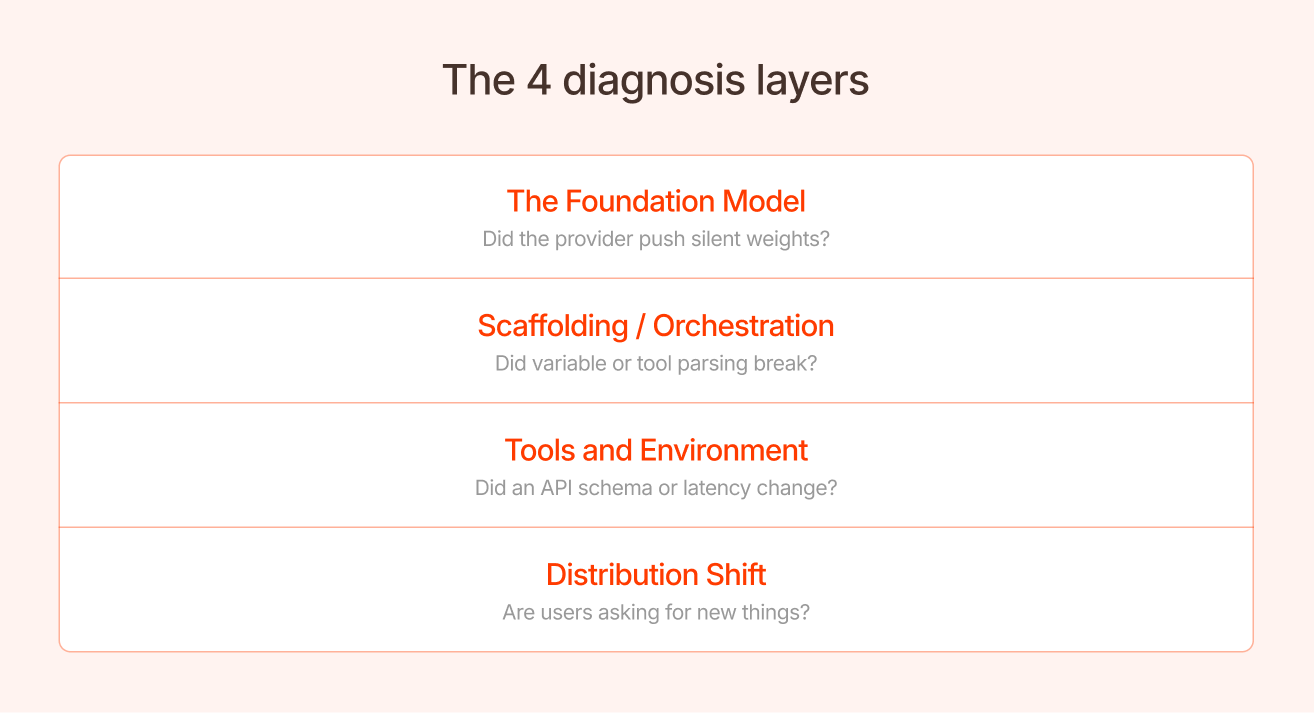
- The Foundation Model: Did your provider push a silent weights update? If your behavior changed overnight without a code deployment, check this first. Don't try to patch a model drift problem with a prompt edit. Pin your versions or re-evaluate your baseline.
- The Scaffolding/Orchestration: Did a recent engineering change break how variables or tool outputs are parsed into the context?
- The Tools and Environment: Did an underlying database or API change its return schema? Did network latency cause a critical tool call to time out, poisoning the context?
- Distribution Shift: Are real-world users suddenly asking for things your initial eval suite never accounted for?
Fixing a bug at the wrong layer is how you introduce the next regression. Patching an underlying tool schema problem by hardcoding a rule into the system prompt means your prompt is now compensating for a systemic lie. That lie will eventually collide with an adjacent feature.
How Bento handles this
The reason managing agent regression feels like a treadmill is that system learnings don't carry forward. You resolve an incident, the context lives in a Slack thread or a git commit message, and the next person who touches the codebase lacks that context.
BentoLabs is built to close this feedback loop natively, replacing manual prompt-hacking with an automated pipeline for system artifacts.
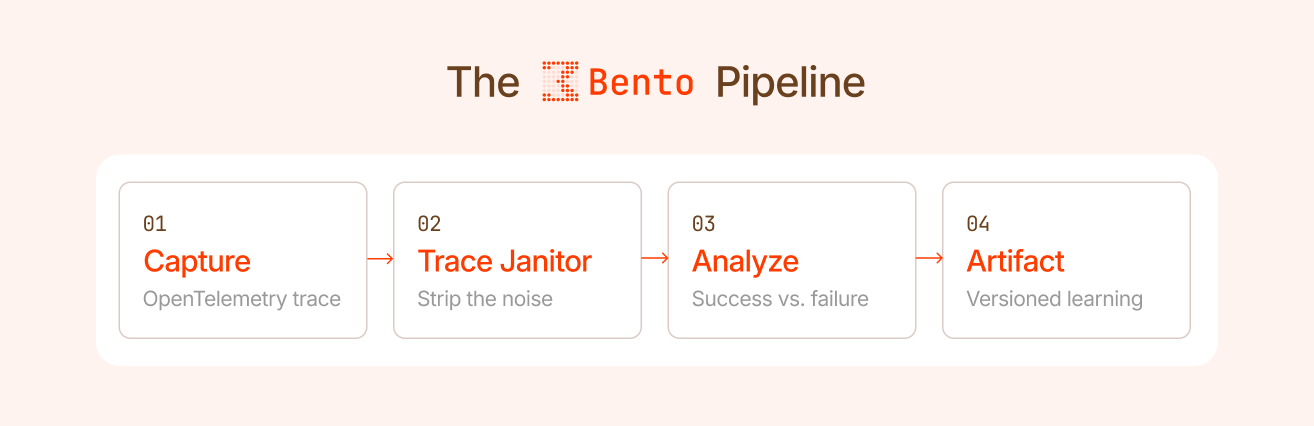
When an agent runs on Bento, our platform captures the complete OpenTelemetry execution trace, tracking every span, tool argument, model call, and intermediate state. Because raw traces are noisy, Bento passes them through a Trace Janitor phase. This stage strips out redundant steps, and verbose reasoning tokens that didn't move the environment state forward.
Once cleaned, Bento structurally analyzes the trajectory to evaluate what patterns preceded a successful outcome versus a failure. That analysis goes into a Artifact (Skill, Tool, Subagent, Guardrail, System Prompt fix), which serves as a structured, versioned record of learned behaviors optimized for that specific task category.
Turning failures into compounding value
With the right infrastructure, regression stops being a reactive firefighting exercise. Every production failure gets caught by automated signals, contextualized within a living history, and converted into a permanent upgrade to your agent's capabilities.
The information about why your agent failed is the highest-leverage data asset you own. Most teams throw it away, buried in Slack threads, lost in a prompt refactor, never tested again. Bento makes sure you capture it, test it, and build on top of it.
Ship boldly. Watch the trajectories. Fix at the right altitude. Let every bug make the agent smarter, not the prompt longer.
If you are running an AI agent in production and want to build the infrastructure that catches it automatically, that's what BentoLabs is for.